
Marine navigation systems have come a long way, especially as larger displays and touchscreen interfaces have become more common across vessel bridges. At first glance, it might seem like touchscreens could replace everything else, but once you step into actual marine conditions, a different problem shows up.
Touch-based systems highly depend on stability. Marine environments cannot always guarantee this. Movement on marine vessels, weather, and constant motion make it hard to rely on touch systems alone, especially when accuracy and safety are at stake. That is why trackballs and keyboards are still widely used — they solve problems that touchscreens cannot.
We’ll break down what works, what doesn’t, and how to choose the right input setup for your vessel.
The Problem With Relying on Only Touchscreen for Marine Vessels
When operators rely only on touchscreens for data entry, minor disruptions can turn into larger inefficiencies.
Vessel movement, changing weather conditions, and the need for precision can make it harder to input accurate information.
Leading to issues on board like:
- Slower data entry when typing on a touchscreen.
- Increased errors when entering coordinates or navigation details.
- Difficulty making edits to routes.
- Interruptions when switching between different tasks or systems.
- Reduced efficiency during longer operations where repeated input is required.
Although these challenges may seem minor at first, over time they affect workflow and increase the likelihood of mistakes. Making it harder for operators to stay focused on navigation and system management.
In environments where logging, reporting, and system interaction are routine, inconsistent input methods can create unnecessary friction and slow everything down.
The Solution? A Stable Input System
The challenges of unstable control are solved by using input devices that are designed for marine conditions, not adapted to them.
Trackballs and keyboards work together to create a system that will remain usable even when conditions are not ideal.
Each one of these tools solves a different part of the problem. Together they provide a level of control and consistency that a touchscreen alone cannot match.
Trackballs support a more precise system control by allowing vessel operators to move the cursor without relying on a steady surface or hand position. This makes it easier to interact with tools like radar, ECDIS, sonar, and camera systems. At the same time, keyboards provide a more reliable way to handle structured input.
Tasks like logging data, entering coordinates, editing routes, and managing system inputs can be done more accurately and efficiently when there is a dedicated input method that is designed for that purpose.
When keyboard and trackball are combined, they create a balanced system that supports your vessel.
How these systems support your operations:
- Provide stable cursor control during vessel movement.
- Enable faster execution across systems.
- Reduce possible input errors during critical operations.
- Create a consistent workflow that holds up over time.
This is why marine navigation systems are built with multiple input methods. It is not about preference — it is about maintaining control, accuracy, and efficiency across changing conditions.
What to Look for in Marine Keyboard and Trackball Devices
Not all trackballs and keyboards are built for marine environments, so it is important to look at the standards that guarantee long-term performance.
Buyers should pay attention to:
- IP ratings such as IP65 or IP67 for protection against water and dust.
- MIL-STD-810 testing for shock and vibration resistance.
- Salt fog testing to prevent corrosion over time.
- EMC and EMI compliance to avoid interference with other onboard systems.
- Backlighting and NVIS compatibility for low-light or night operation.
These features are not optional for marine use. They help guarantee that the equipment continues to perform under the conditions it will actually face.
When control matters, the input device you choose needs to perform consistently. Check out our top marine trackball and keyboard solutions below.
Top Marine Trackball and Keyboard Solutions
Rugged Trackball Module (F50 Series)

This solution fits best where:
- Vibration and shock are constant.
- Precise cursor control is critical.
- Integration into consoles or keyboards is required.
- Long-term reliability is expected with minimal maintenance.
This trackball is a dependable option for marine, military, and industrial applications. View the F50 Series Trackball Module.
Rugged Trackball Module with HALO Light (F50 Series)
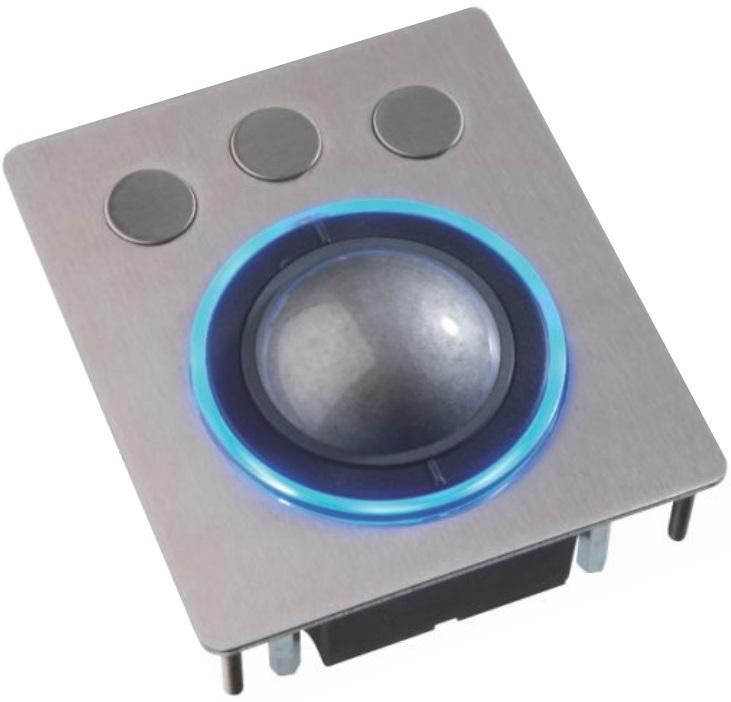
This solution fits best where:
- Low-light environments require clear visibility of controls.
- Operators need to quickly locate input devices.
- Precision and durability must be maintained in all conditions.
- A rugged, integrated solution is required.
IEC60945 Marine Ergonomic Trackball (E50 Series)

This solution fits best where:
- Waterproof performance is required.
- Operators need both precision and scrolling capability.
- Space efficiency matters in control stations.
- Compliance with marine standards is required.
- Perfect when navigating complex systems like radar, ECDIS, and sonar.
With IP68 sealing and IEC60945 compliance. View the E50 Series Marine Trackball.
IP68 Trackball with Scroll Wheel (LTSX50 Series)


This solution fits best where:
- Full waterproof protection is required.
- Exposure to salt, dust, or grease is expected.
- Easy maintenance and cleaning are important.
- Reliable operation is needed in both indoor and outdoor environments.
Fully sealed IP68 trackball with an integrated waterproof scroll wheel. View the LTSX50 Series Trackball.
MIL-SPEC Rugged Keyboard with Integrated Trackball (MKBE104)

This solution fits best where:
- Both cursor control and data entry are required in one device.
- Space is limited within a control station.
- Operators need a consistent workstation setup.
- Reliability is critical in demanding environments.
With IP65 sealing, backlit keys, and a rugged aluminum enclosure. View the MKBE104 Keyboard.
MIL-SPEC Rugged Full Travel Keyboard (MKB87 Series)

This solution fits best where:
- Dedicated data entry is required as part of daily operations.
- A fixed workstation is used for logging and system management.
- Long-term reliability and tactile feedback are important.
- The environment requires a sealed and durable keyboard.
Featuring IP65 sealing, full travel backlit keys, and a rugged aluminum construction.
Choosing the Right Input System for Your Vessel
We know that marine environments are unpredictable, so input devices should be selected with that in mind. Touchscreens offer convenience, but they cannot replace the control and consistency that trackballs and keyboards provide.
- Trackballs make it easier to maintain control during vessel movement.
- Keyboards support reliable data entry and system management.
Together, they create a navigation setup that is usable and safe across a wide range of conditions.
At Seatronx, we understand that no two vessels or applications are exactly the same. Input devices are not one-size-fits-all, and the right solution depends on how your system is used, where it’s installed, and the conditions it operates in.
That is why we work with customers to help tailor input solutions to their specific applications, whether that includes selecting the right trackball, integrating a marine keyboard into a workstation, or building a complete system that supports long-term reliability.
The goal is not just to add hardware, but to ensure that every part of the system works together to maintain control, accuracy, and safety over time.
If you are evaluating input devices for your system, our team can help you choose a solution that fits your application.
Related reading: Why Sunlight Readable Displays Matter at Sea